Wordless Wednesday
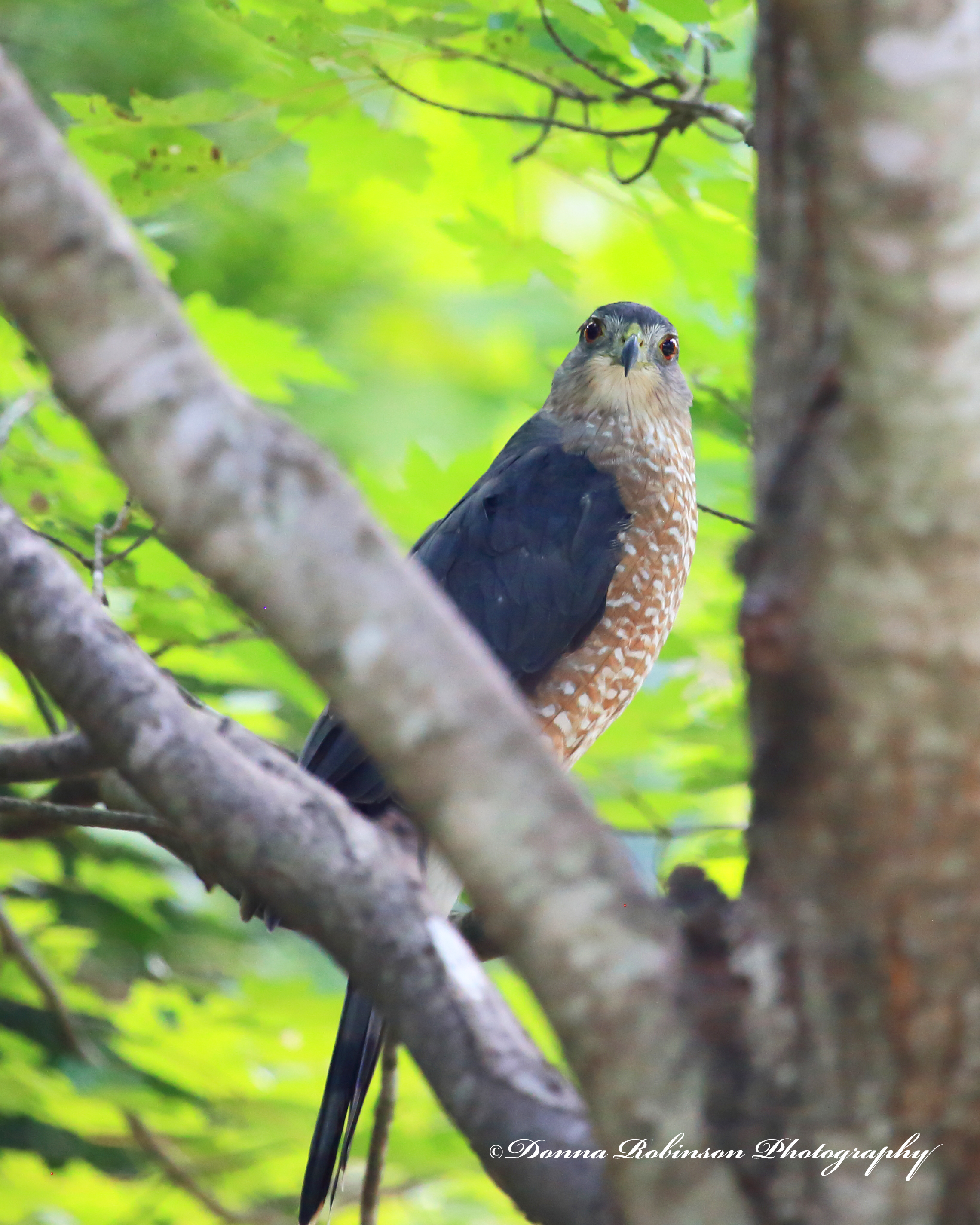
Hungry Eyes

One evening as we were sitting on our back patio, we heard a rustle through the trees and a thump. “What was that?” Michael asked as I quickly pulled up my camera and began snapping away. A few snaps later and I had the perfect shot of this Coopers Hawk right before he took off.
I must have searched through a hundred songs about eyes, before I landed on the title for this post (Hungry Eyes by Eric Carmen). Seems appropriate to me, since he was out grocery shopping (as Michael likes to say) when he made a layover in our maple tree. What do you think? Do any other songs about eyes come to mind?
Until next time,
~donna
Silent Sunday
Silent Sunday
Lens-Artist Challenge #296 – Abstract
Ritva leads this week and boy does she have us stepping out of our comfort zone, but in a fun way. In her challenge she has us exploring abstract photography and in her words “breaking the rules of realism.”
“If you obey all the rules, you miss all the fun!”
_Katherine Hepburn
There’re quite a few ways to create abstract photography whether “in camera” or through the editing process. I thought I would share with you some images I took “in camera.”
In this first image I had read about a technique placing a baggie (or plastic wrap) over the lens to give a soft, moody kind of feel. To experiment with this technique, I shot a matted 5 x 6 photo. When I added the baggie over the lens and reshot the photo it produced an even more “antique-ish” kind of feel. It’s almost like the photo was so old that it was beginning to fade away.
With the images below I used the “multiple exposure” setting in my Canon EOS 6D. It’s a VERY cool setting that allows you to take up to 9 different images and the camera will merge them together. I’ve only tried it with two (2) images so far.


Another fun “in the camera” technique is “zooming.” A tripod or really steady hand is very helpful with this technique because as you’re using a slow shutter speed (i.e 1/5 th – 1/8th ) and as you’re taking the picture, you’re rapidly turning the lens to achieve the effect you want. Of course, you can also achieve this in Photoshop, but it’s pretty fun to challenge yourself with the camera.


The possibilities are limitless in creating abstract photography. It just depends on the story you’re trying to tell through your image as to what abstract technique you want to use.
Thank you Ritva for this fun and creative challenge. If you’re joining in on this challenge, be sure to link to Riva’s post in the “comments” section and also use the Lens-Artist tag.
Next week Egídio is hosting. He has some amazing photography so be sure to subscribe to his blog Through Brazilian Eyes.
Until next time!
–donna
Silent Sunday
Lens-Artist Challenge #295 – Rock Your World
Donna, from Windkiss has brought us back down to earth (so to speak) with a challenge that gives a nod to Earth Day and all things “rocks.” You can read her full challenge here.
So, let’s get started. No matter where you turn rocks play an important role on this planet.
They lead us through tunnels to find the light at the end.
Located in Galax, VA is the New River Trail which is a 57-mile linear park that follows an abandoned railroad tracks (part of the “rails to trails” system). The park parallels the scenic and historic New River for 39 miles and passes through four counties and the city of Galax. The photo below is one of two tunnels located on the trail.

They can be a fortress offering protection from society.
This is as close as I have ever come to Alcatraz. Having seen movies and documentaries about “The Rock” it looks like a great place for photo ops. Perhaps one day I’ll make it back out there.

They can be great tourist attractions.
If you look just beyond the tallest skyscraper, you’ll see a HUGE mountain (also called “The Rock”). It’s actually granite and is documented to have been formed 300 million (yes million) years ago. Stone Mountain, as it (and the surrounding town) is named, is located just east of Atlanta. You can climb to the top of the, take a train ride around the base of it and so much more. Interestingly, I took this photo when we lived in a condo where we had panoramic views of Atlanta.

They provide firm foundations for those wonderful lighthouses providing a watch-light for boaters on dark and stormy nights.
Pigeon Point Lighthouse is located in Pescadero, CA. I’ve shared before that many years ago Michael and I drove the Pacific Coast Highway from San Diego to San Francisco (Christmas Day – New Year’s Day). We had no map, no plans and no place to be. Literally, we made no hotel reservations. I share a little bit about that trip in an earlier post Lens-Artist Challenge #215 . A fun adventure indeed, with some good and not so good hotel choices.

They offer a resting place for mother nature.
Downtown Greenville, SC has gone through a revitalization over the years and one of the many great qualities is how they have incorporated Reedy Creek into the landscape, meandering along the sidewalks and spectacular walking trails.

They can cause the rise and fall of tides here on earth.
Ok, so while not of planet earth, per se, we can’t forget about that big rock up in the sky that affects our lives in so many ways down here! I guess you could say it’s the “ying” to earth’s “yang.”😉

Thank you, Donna, for making us stop and appreciate our planet earth! It was a fun to stop and think about all this big round ball has to offer to us.
For those of you who are interested in knowing more about the Lens-Artists challenge click here. Next week it’s Ritva’s turn to lead us through another fun filled challenge. Be sure to see what she has in store for us at noon EST this Saturday.
Until next time,
~donna
Lens-Artist Challenge #294 – Before and After

This week’s Lens Artist Challenge, hosted by John, leads us down the path of examining how we edit our photos. As photographers we don’t just take a photo of what we see with our eyes, but oftentimes we take photos of what we see the end result to be. Are you with me?
I haven’t had much time behind the lens lately, so instead of going back through my library of images, I decided to get outside in our garden. I mean, what better way to share my before and after process than taking pictures in real time?!? So, here it goes.
Each of my examples were shot in RAW and first brought into the Canon Digital Professional Editing tool. There I could more accurately adjust the white balance and any other lighting/color tweaks. I’m sure I could do the same in Photoshop, but it’s what has worked for me over the years. Why fix what isn’t broke, right? I then brought all images into Photoshop to crop, make a few more minor color adjustments and apply copyright information.
Up first is one our many hydrangea shrubs. They are covered with buds this year and I’m excited to see their blooms come in. The top photo is my before shot to me it was just a little too much on the yellow green side.

In the Digital Professional editing tool, I warmed up the white balance with the temperature control and then I moved up the contrast slide a few notches and voila! The leaves are a much richer, deeper green with better definition of the veins on the leaves. Once I pulled it into Photoshop, I cropped it in to bring more focus to the cluster of buds.

Next up was our Dogwood tree. It has really given us a wonderful show of blossoms this year. I was almost a little too late in taking photos. Thankfully, I managed to get a few shots in before the next round of wind and rain blew more off the tree.
Here’s my first shot. I was using my macro lens to capture the detail of the flowers. Unfortunately, the sun was moving in and out of the clouds and I was having a hard time keeping my settings straight. Also, the wind caused a major battle in getting a sharp imagine. But, of all the images, this was the one which closely matched what I was envisioning.

In my after shot, I really like how the white balance temperature setting warmed up the darker tones of the petals and flowers. I was also able to brighten it up a little without blowing out the detail. Because I had done all the tweaking in the Digital Professional Editing tool, I only needed to crop it slightly once I brought it into Photoshop.

Last up in my garden tour is this rosebud. Once again, the sun and the wind were wreaking havoc on the shot (it’s a red rose, not a pink rose). Still using my macro lens, I wanted to get a better shot of one of the water droplets. That just didn’t work so I settled on a wider perspective of the various curves of the bloom.

Editing was a little challenging because to me the highlights were washing out the petals. But then I found an edit button “Linear” just under the “Contrast,” “Highlights,” and “Shadows” buttons. And just like that the entire image transformed into a beautiful red rosebud. Plus, the water droplet stands out!

But the highlight was still distracting to me. So, I went into the RGB tab and tweaked each individual color. Much better, but now it’s a little too dark.

One last little tweak and here’s the final image.

I hope you enjoyed my little tour of our garden and how I process my photos. It was nice to get outside and back behind the lens. Thank you, John for this week’s challenge.
Next week, Donna of Wind Kisses will host the challenge. You can also find more information here if you want to join the fun.
Until next time!
-donna